

Artist Alley POS & Event Manager
MIMO began as an existing prototype created by an independent artist for their own convention sales workflow. I joined the project to evaluate the experience, identify critical usability and system issues, and develop it into a more reliable tool for real-world use.

MY ROLE
Product Designer / UX Designer / AI-Assisted Prototyper
TIMELINE
4 Months
TOOLS
Figma, Codex, Cursor, Github Co-Pilot, Miro
DELIVERABLE
Functional webpage
RESPONSIBILITIES
UX audit and pain-point identification → Redesigning Information architecture → Respond to Product requirements and feature prioritization → Interaction and interface design → Rapid prototyping through Codex → Iterative QA and usability review → Field research planning and testing
The existing prototype supported basic sales, but lacked the workflow structure, flexibility, and reliability needed for real convention operations.


UX audit
Revised IA/flows
Rapid Iteration
Field testing
Visual-system Refinement
Problems identified through stakeholder interview and product review.
PAIN POINT 1
Selling required too much manual effort
Frequent convention tasks were fragmented, and key transaction details such as payment methods and sales records were not consistently captured.
PAIN POINT 2
Inventory management did not scale well
Adding and updating larger product catalogs was cumbersome, with no bulk-import workflow and limited support for efficient stock management.
PAIN POINT 3
Information lacked a clear grouping structure
Current events, historical records, sales data, and operational tools were not clearly grouped, making navigation and information retrieval harder than necessary.
As features accumulated, related tasks became scattered across the prototype, making the relationship between event setup, live selling, and historical records unclear. I reorganized the product around the seller’s workflow by separating live operations from management and setup tasks.

BeforeRegister | Inventory | Past Orders | Promotions | Summary | Notes
Everything existed as independent destinations.

AfterLIVE OPERATIONS → Register | Past Orders | Summary | NotesMANAGEMENT & SETUP → Events | Inventory | Promotions | Settings
A reorganized structure that separates high-frequency live operations from lower-frequency management and setup tasks.

Key Decisions
Prioritized high-frequency workflows — Register and transaction review were kept together for live selling.
Separated operational and management tasks — Event configuration, inventory setup, promotions, and settings were grouped away from the primary sales workflow.
Created clearer ownership of event data — Events became the central place for managing active and historical convention information.
A) Separating Event Management from Performance Monitoring
01 PROBLEM
The original Summary page combined current event details, event management, and performance metrics in one place, making the page feel redundant and blurring the distinction between managing an event and reviewing its performance.

02 EXPLORATION
audited the original Summary layout
identified overlap between Summary and Events
explored splitting the content into two clearer destinations
reorganized the Summary layout to prioritize key performance information


03 SOLUTION


I separated Events from Summary and gave each section a clearer responsibility:
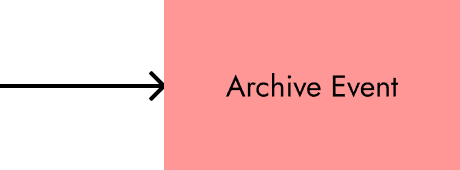
Events became the place to create, edit, archive, and manage event-specific information
Summary became a dashboard for monitoring current event performance, including sales totals, break-even progress, goal tracking, and top sellers
B) Making large inventory management faster
01 PROBLEM
The original inventory workflow depended on per-product entry and one-by-one editing, making setup and maintenance slow for sellers managing larger product catalogs.
Preparing many products before an event required repetitive manual input, and small updates had to be made item by item.

02 EXPLORATION
Reviewed the existing per-product inventory workflow
Identified two high-frequency needs: initial bulk setup and multi-item editing
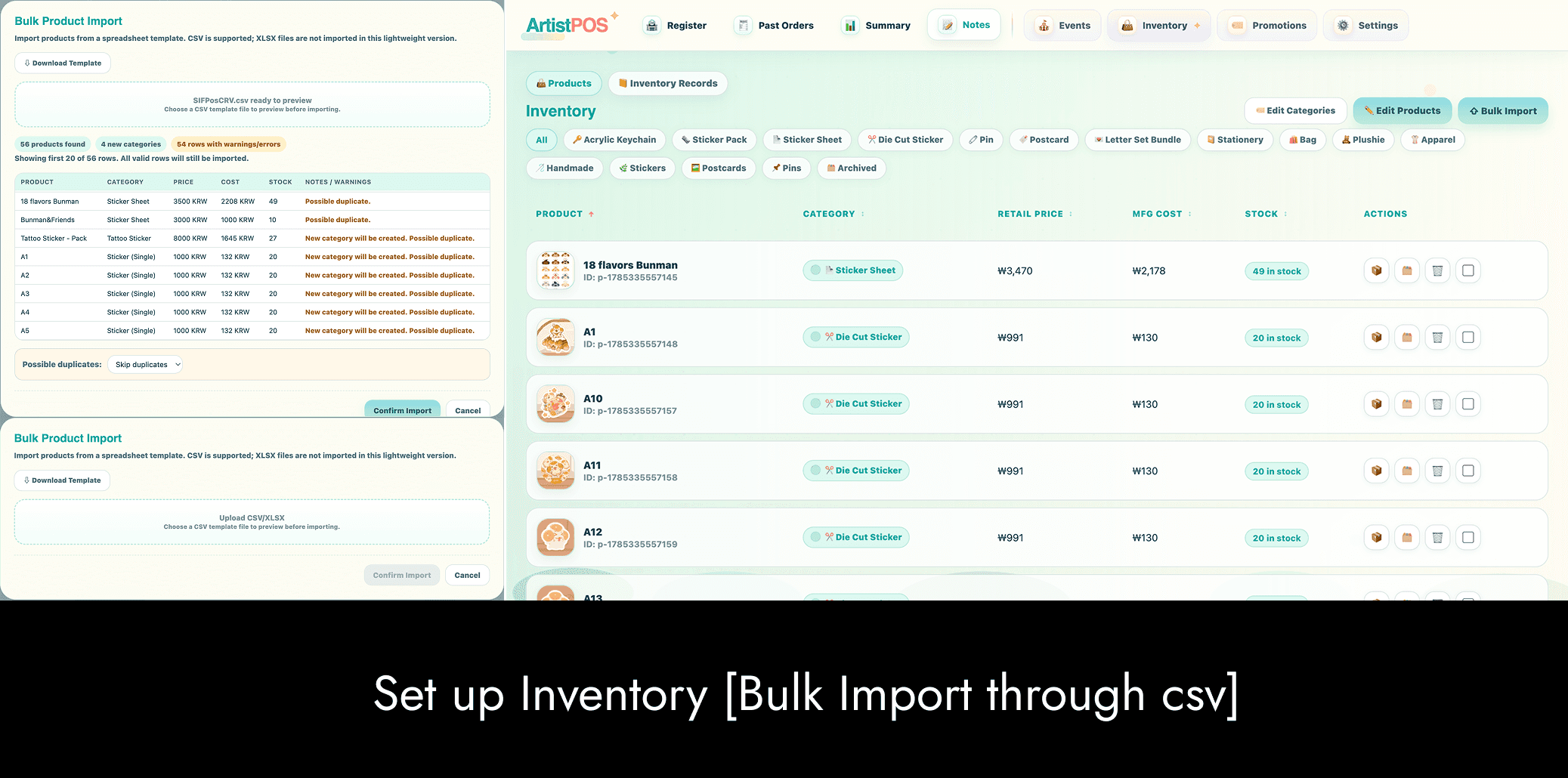
Explored a CSV import flow for faster product setup
Explored an edit panel pop up that would allow multiple products to be updated in one place


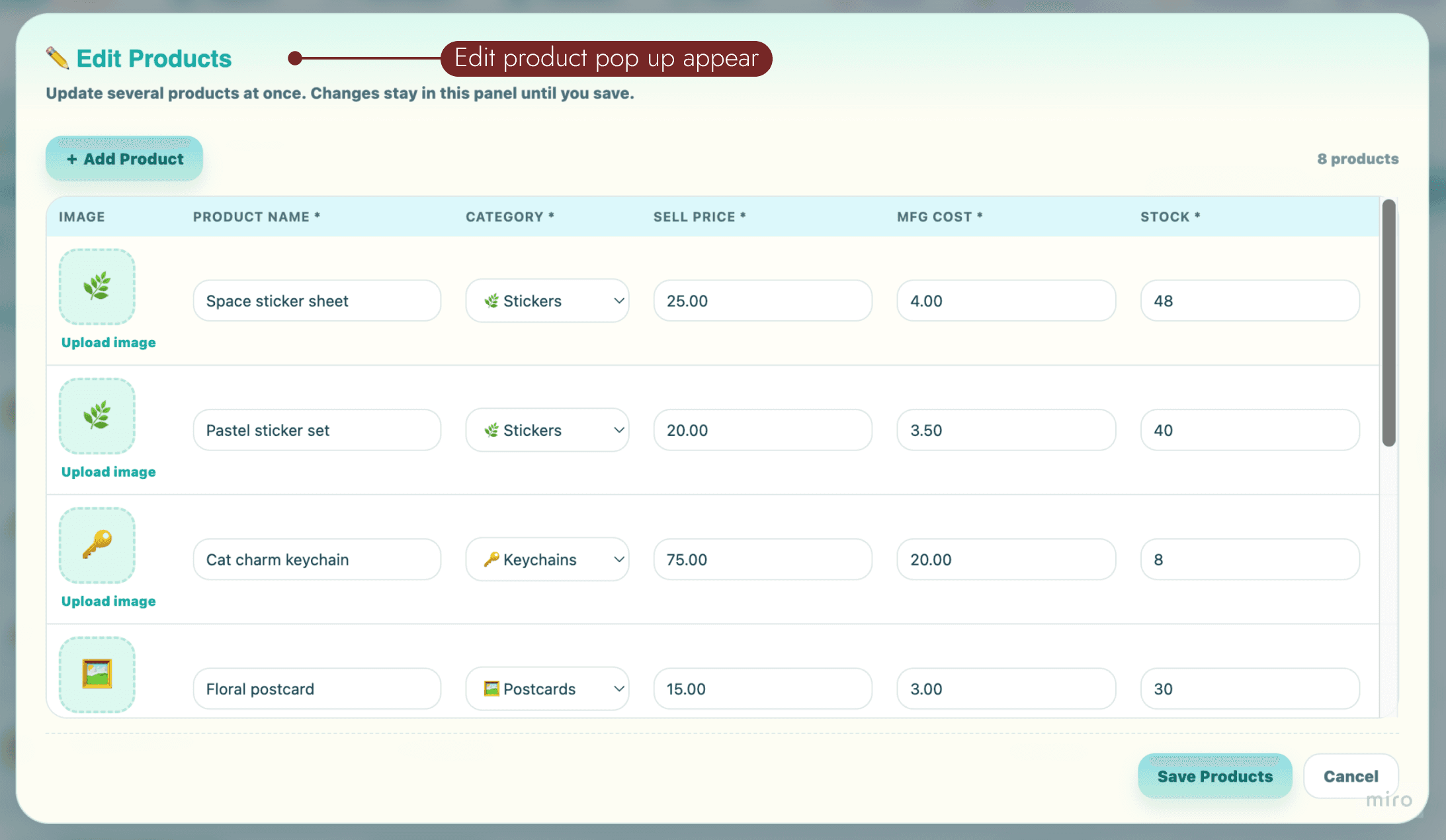
03 SOLUTION


I introduced two scalable inventory workflows based on task size:
Bulk import for faster product setup through a spreadsheet template
Edit mode on the same page for updating multiple products in one place without pulling up a separate panel for edit
This allowed users to:
import larger product catalogs more efficiently
review imported rows before confirming changes
update multiple products in one pass
still retain direct product editing for smaller adjustments
B) Designing checkout around real convention transactions
01 PROBLEM
Real convention sales often changed mid-transaction: from switching payment methods to adding gifts, discounts, or last-minute order adjustments.
The original Register lacked the flexibility to accommodate these changes without disrupting checkout or creating incomplete records.

02 EXPLORATION
Restructured the right-side order panel
Gave the current order more dedicated space
Required payment-method selection before confirmation
Integrated promotion selection into checkout
Clarified subtotal, discount, and total states
Improved confirmation and transaction feedback


03 FINAL CHECKOUT SOLUTION
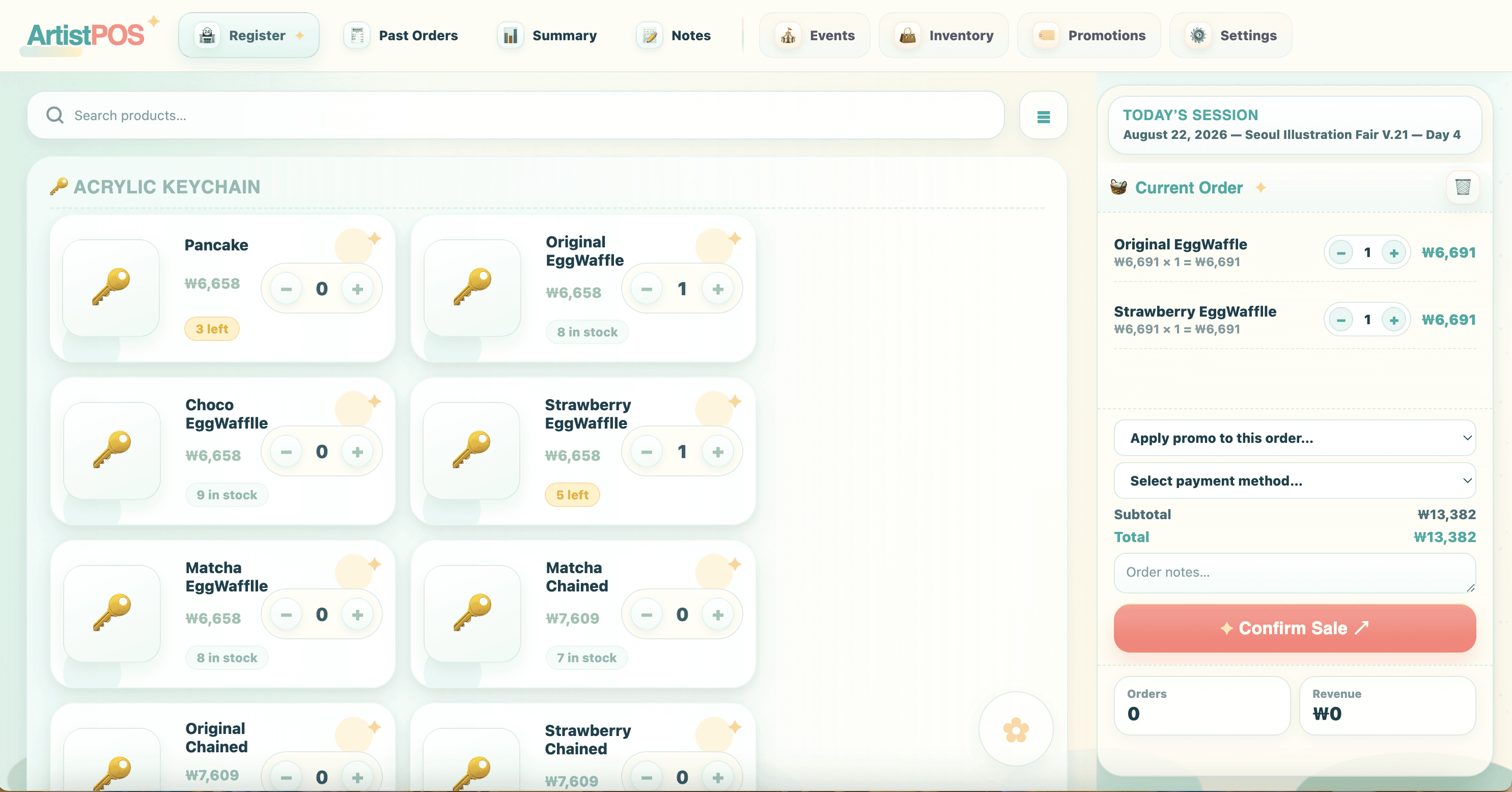


The final checkout consolidated the most important transaction controls into one workflow, with several changes designed to support fast, unpredictable convention sales.

Required payment recording
A sale cannot be confirmed until a payment method is selected, improving the completeness of transaction records.
Flexible transaction states
Gift transactions can be recorded at $0 without manually modifying product prices.
Integrated promotions
Promotions can be applied directly within checkout and reflected immediately in the order total.
Clearer order hierarchy
Items, quantities, discounts, payment, and final totals are organized into one consistent sequence.
Transaction confirmation
Successful sales provide immediate confirmation before the next order begins.

Before the Event
During the Event
After the Event





Select Payment Method & Confirm Sale


Event
The prototype was deployed at a 4-day illustration convention - The Seoul Illustration Fair V.21 (SIF v.21) that took place from July 30 to August 2, 2026, at COEX Hall C in Seoul.
Primary user
The product’s original creator and an independent artist with prior artist-alley experience.
Duration: 4 days
Environment: Live artist-alley booth
Participant: 1 primary user
Methods: Observation, field notes, system records, and post-event interview


Through field observation, system records, and a post-event interview, I identified usability and reliability issues to prioritize for the next iteration.
To complement my field observations, I conducted a post-event debrief with the primary user to understand what worked, where friction remained, and what should be prioritized next.

Most orders were smooth, especially when using the cash calculator. It saved the cash received and change in Past Orders.
I avoided changing the currency or event details because I was afraid it might mess up all the data.
Past Orders was very useful for payment cross-checking and bookkeeping, especially with the order timestamps.
Combining these reflections with my field observations, I synthesized the recurring issues and behaviors into the following key findings.
1

Currency and data inconsistencies reduced trust
Repeated currency, promotion, and logging inconsistencies reduced confidence in the accuracy of sales records.
EVIDENCE
Currency settings unexpectedly altered product prices.
Default promotion rules reappeared after deletion.
Price changes were not consistently recorded in Inventory Records.

IMPACT
In a live sales environment, inaccurate prices or records could affect transactions, inventory, and end-of-day reporting. User had to manually reset some of the price values.
DESIGN DIRECTION
Store prices in the selected event currency.
Apply consistent currency formatting.
Fix promotion persistence.
Log all price changes.
2
Inventory editing was too far from the item
When the user needed to change one product, they expected to edit it directly but instead had to scroll up and enter batch-edit mode. Scenario comes up especially when there is a need to adjust price.

IMPACT
Small corrections became slower than necessary during active event operations.
DESIGN DIRECTION
Add direct per-product editing.
Keep batch editing for larger updates.
Reduce scrolling and context switching.
3
Navigation did not reflect actual usage
The user initially hesitated when navigating between Register, Inventory, and Events because the grouping did not match their expected workflow.
EVIDENCE
Inventory was accessed much more frequently than Events as there are constant occation where price has to be adjusted.
The current event was not automatically surfaced.
The user needed time to understand the relationship between sections.
IMPACT
High-frequency actions required unnecessary navigation decisions during live selling.
DESIGN DIRECTION
Prioritize Register and Inventory, clarify the relationship between operational and administrative tabs, and automatically surface the active event.
3
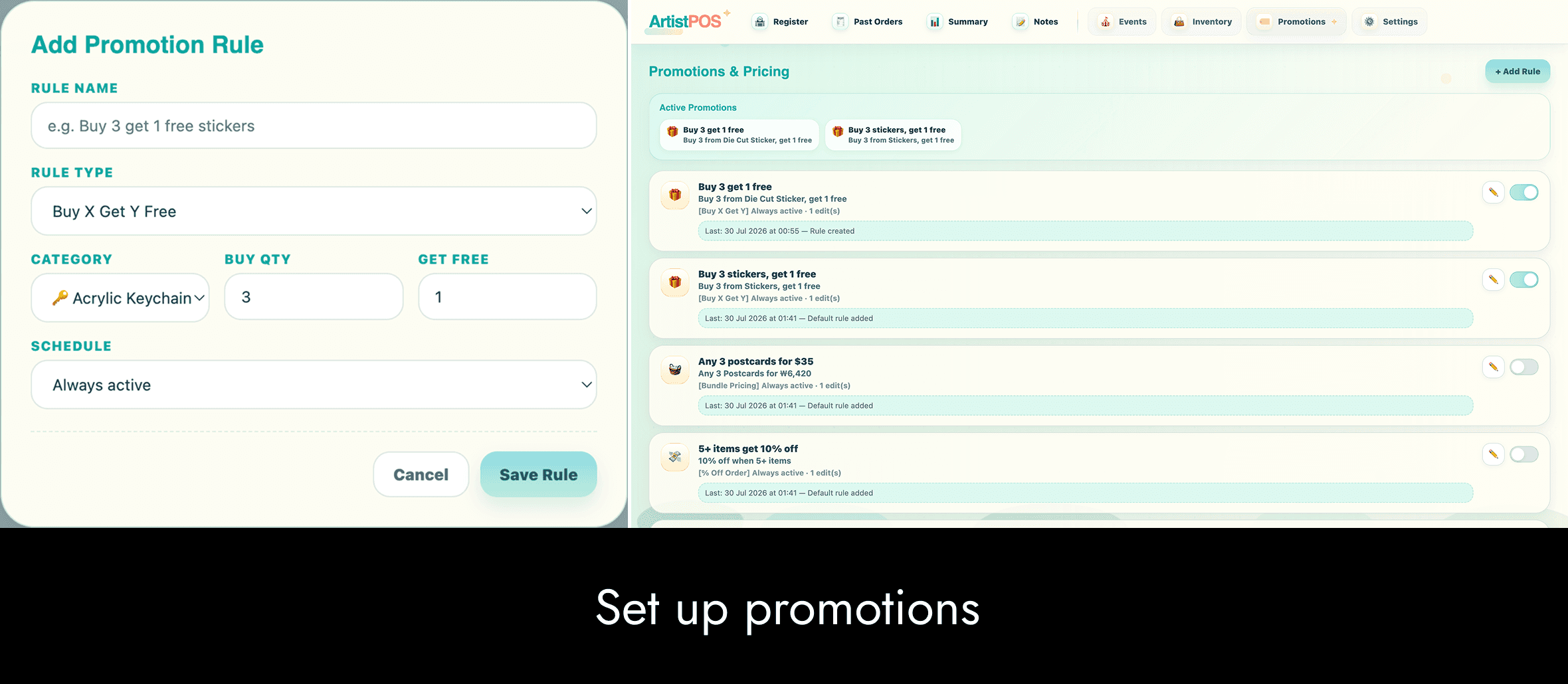
Promotion rules did not match real selling behavior
Promotion rules lacked the flexibility needed for product-specific discounts and bundles, leading the user to create manual workarounds.
EVIDENCE
Promotions were rarely used because rules could not target specific products.
The user created bundles as separate inventory products instead, which did not deduct stock from the original items.
“Buy 3, Get 1 Free” required adding four items before the discount was applied, which made the interaction unclear.
IMPACT
The rigid promotion model encouraged manual workarounds, increasing the risk of inaccurate pricing and inventory records.
DESIGN DIRECTION
Support more flexible, product-level promotions while keeping pricing and inventory synchronized.
Support bundles made from existing inventory items.
Automatically update component stock when a bundle is sold.
Clarify when and how “Buy X, Get Y” discounts are applied.
Simplify promo activation to avoid overlapping controls.
Based on the field findings, I began refining the visual system and key high-frequency screens while planning deeper changes to data handling, promotions, and event management.

Home - Register Screen

Home - Expanded Navigation Bar

Inventory page
This project changed how I think about rapid AI-assisted prototyping. Building quickly made it possible to test a functional product in a real selling environment, but the field deployment also exposed areas that rapid implementation alone could not solve, especially system trust, data integrity, and support for unpredictable real-world workflows. Working directly with the primary user helped me move from adding features toward designing a more coherent product system.


phone.
(917) 306 5513
email.
hiulamhilaryc@gmail.com
find me @

